How to Use a Breville Toaster Oven
To use a Breville toaster oven, choose a cooking function, set the temperature and time, then start cooking after preheat if the display calls for it. Use convection when you want the fan to circulate hot air, and check food before the timer ends.
On this page (8 sections)
- How do you use the Breville oven controls?
- Which Breville cooking function should you choose?
- When should you use convection?
- How do you set time and temperature?
- What cookware fits in a Breville toaster oven?
- How can you use the oven safely?
- How do you clean the oven after cooking?
- How do you get better results from a Breville toaster oven?
To use a Breville toaster oven, select a cooking function, set the temperature and time, and follow the preheat signal before adding food when the recipe calls for it. Check food before the cycle ends, since portions and recipes can cook at different rates.
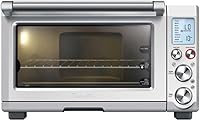
The Smart Oven Pro has 10 functions: Toast, Bagel, Bake, Roast, Broil, Pizza, Cookies, Reheat, Warm, and Slow Cook. Its LCD shows when preheat is complete and starts counting down the cooking time.
How do you use the Breville oven controls?
Choose the function that matches your food, then set the temperature and cooking time. The Smart Oven Pro's LCD lets you access its functions and shows the preheat status and countdown.
For a first use, place the oven on a stable counter with room for ventilation, and read the manual for clearance and setup instructions. Keep the cord away from hot surfaces, and don't cover the oven while it runs.
Use the rack position and cookware recommended for the recipe. Arrange food with space around it so heat can circulate, and keep it clear of the heating elements.
How to use a Breville toaster oven for toast
Select Toast for bread, then use the oven's controls to choose the browning level and quantity that suit your batch. Check the bread as it cooks, especially when trying a new setting or a different thickness.
The Bagel function is intended for bagels. If the result is darker or lighter than you want, adjust the setting the next time rather than leaving food unattended.
Which Breville cooking function should you choose?
Pick the function that best matches the food and cooking method. For another brand's controls and modes, see how to use a Cuisinart toaster oven.
For example, choose Bake for baked dishes, Roast for roasting, Broil for direct top heat, and Reheat for leftovers.
| Food or task | Function to try |
|---|---|
| Bread | Toast |
| Bagel halves | Bagel |
| Cakes, muffins, or baked dishes | Bake |
| Meat or vegetables | Roast |
| Browning the top of a dish | Broil |
| Pizza | Pizza |
| Cookies | Cookies |
| Leftovers | Reheat |
| Holding cooked food warm | Warm |
| Long, low cooking | Slow Cook |
Treat the table as a starting point, not a substitute for a recipe or the oven manual. Use the cookware and temperature that the recipe calls for, and check for doneness before serving.
The Smart Oven Pro's Slow Cook function can run for up to 10 hours, then automatically switches to Keep Warm. Follow a recipe's safe cooking guidance and don't use the oven as a substitute for proper food handling.
When should you use convection?
Use convection when you want the inbuilt fan to circulate hot air around the food. Breville says this setting can reduce cooking time by up to 30%, but the exact time depends on the recipe and amount of food.
Check food earlier than you normally would when trying convection for the first time. If a recipe was written for a conventional oven, follow any conversion advice it gives and watch for browning.
The Breville has five independent quartz heating elements that its Element iQ system adjusts for the selected setting. For more on how countertop ovens heat food, see how a toaster oven works.
How do you set time and temperature?
Use the recipe's temperature and time as your starting point, then select them on the oven. The Smart Oven Pro's display indicates when preheating is done and begins the countdown automatically.
Don't assume every recipe needs the same time in a countertop oven as in a full-size oven. Check food early, use a thermometer for meat when appropriate, and continue cooking in short intervals if it needs more time.
For slow cooking, select the Slow Cook function and follow a recipe designed for that method. The function's automatic switch to Keep Warm happens after its cook cycle, but it doesn't replace checking that food has cooked safely.
What cookware fits in a Breville toaster oven?
Use cookware rated for oven use that fits without touching the walls or heating elements. The Smart Oven Pro includes an oven rack, a 12 x 12 in enamel baking pan, a 12 x 12 in enamel broiling rack, and a 13 in non-stick pizza pan.
Check the manual before using glass, ceramic, or other specialty cookware. Handle pans with oven mitts, and place hot cookware on a heat-safe surface.
If you want a compact oven with preset controls, the Panasonic FlashXpress has six one-touch cooking functions and a manual temperature control and timer. For a countertop appliance that combines microwave and convection cooking, compare countertop microwave oven combos.
Its design uses infrared heating elements, and Panasonic says no preheat is required for this oven.
How can you use the oven safely?
Keep hands and sleeves away from hot surfaces, and use oven mitts when moving racks or pans. Leave space for ventilation, keep the oven away from curtains or other items that can catch fire, and supervise cooking.
Keep food and cookware clear of the heating elements. Use only accessories and cookware that fit the oven, and don't line the crumb tray or oven interior with foil unless the manual specifically allows it.
The BLACK+DECKER TO1313SBD is a smaller alternative with Bake, Broil, Toast, and Warm functions. If you need a compact microwave for limited counter space, see small countertop microwave ovens.
Its instructions say to preheat for 10 minutes for consistent cooking and to keep food and bakeware at least 1½ in from the top heating elements.
How do you clean the oven after cooking?
Unplug the oven and let it cool fully before cleaning. Remove crumbs from the crumb tray, and clean removable accessories using the method in the manual.
Wipe the interior with a soft cloth and an approved cleaner. Avoid abrasive pads and don't spray liquid directly onto heating elements, the fan, controls, or electrical parts.
For more guidance choosing a countertop model, compare our Best High End Toaster Oven and Best Breville Style Toaster Oven guides. If you're comparing the Smart Oven Pro specifically, read the Breville Smart Oven Pro BOV845BSS review.
How do you get better results from a Breville toaster oven?
Start with the function and recipe temperature that fit the food, then use the display to track preheating and time. Check early when using convection, changing a recipe, or cooking a smaller portion.
Use the included pan when it suits the dish, and keep cookware clear of the elements. If you're shopping for a model or comparing current options, see best Breville toaster oven on sale and our Best Toaster Oven For Seniors guide.
For an everyday routine, choose the function, set temperature and time, preheat when needed, and check the food before serving. Follow the oven manual for cookware, cleaning, and safety instructions.
Frequently asked questions
Do you need to preheat a Breville toaster oven?
Follow the display and recipe. The Smart Oven Pro's LCD indicates when preheat is complete, then automatically starts counting down the cooking time.
Some foods or functions may need a preheated oven for the result you want, so wait for the preheat signal when the recipe calls for it.
What does convection do in a Breville toaster oven?
Convection uses an inbuilt fan to circulate hot air around the food. Breville says the Smart Oven Pro's convection setting can reduce cooking time by up to 30%; check food early because the time needed depends on the recipe, portion, and starting temperature.
Can you use regular bakeware in a Breville toaster oven?
Use bakeware that fits with space around it and is rated for oven use at the temperature you choose. Keep it away from the heating elements, and check the oven manual for size and material limits.
The Smart Oven Pro comes with an oven rack, baking pan, broiling rack, and pizza pan.
How do you clean a Breville toaster oven?
Unplug the oven and let it cool completely before cleaning. Remove crumbs and clean the rack, pans, and crumb tray according to the manual; wipe the interior with an approved method.
Avoid spraying cleaner onto heating elements, controls, or electrical parts.